| Click Tracking |
 |
When a trackable link is defined in a document, ePriority will record traffic through that link. Individual visitations are recorded in the TRAC logs as occurrences of event 6506. Statistics are summarized in the online reports on our web site. See the ePriority Service Overview for a complete description of this feature.
Tracking links are defined by placing ePriority feature tags where you want the links. A "ClickTrack" tag has two properties -- its name and the URL whose traffic you want to monitor.
{{clicktrack:URL}}
Links to be tracked must begin with a protocol specification followed by two
slashes. (Examples: "http://www.ff.com",
"https://private.ff.com", "ftp://docs.ff.com").
They should not end with a slash ("/").
By default, the link that replaces the tag will be to an ePriority tracking server. If you want the link to go to your network, you can use a custom HTTP tracking domain to mask the ePriority tracker.
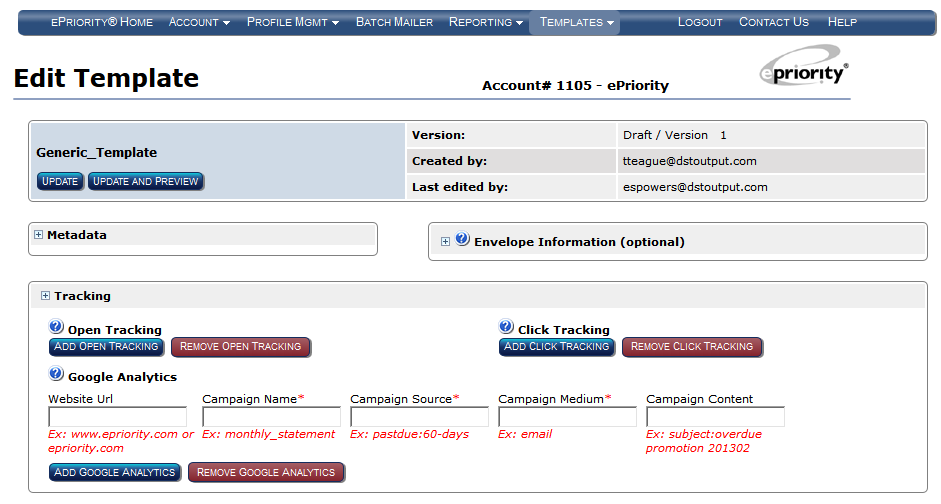
To have Click Tracking automatically added to ePriority Templates without manually editing, select 'Add Click Tracking' in the Tracking section of the Edit Template page. This will apply tracking to all the HTML hyperlinks found in the template.
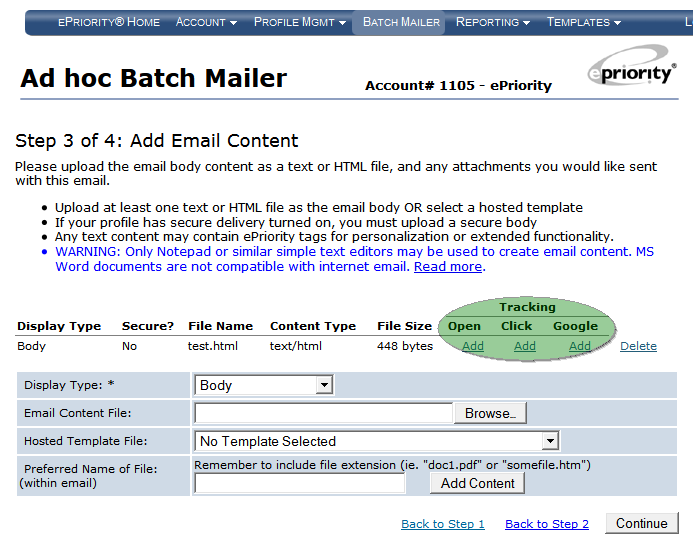
Click Tracking may also be added to uploaded content when using the Batch Mailer.
Note that you must use a Profile with Pending Mode enabled to use this feature.
Examples
- Text Example: Placing a Simple Click Tracking
- HTML Example: Nesting a pData tag within a Click Tracking
- Masking a Click Tracking with a Custom Domain
Text Example: Placing a Simple Tracking Link
Track the use of the Fictional Financial Services Web site for viewing quarterly reports. The TRAC log will contain the details we need to find out which of our recipients viewed their reports online. Aggregate statistics for visits to the login page will be available on the ePriority Web site.
| Before Parsing: |
|---|
Dear Investor:

Our quarterly report is now available online.  To log in,
please visit the URL below:

{{clicktrack:https://www.ff.com/login.html}}

Thank you for investing with us.

Sincerely,
Fictional Financial Services
|
| After Parsing: |
Dear Investor: Our quarterly report is now available online. To log in, please visit the URL below: https://www.epriority.com/2458239/852093/27508 Thank you for investing with us. Sincerely, Fictional Financial Services |
HTML Example: Nesting a pData tag within a Click Tracking
In HTML hyperlinks the destination of the link is not viewable in the email body, so recipients usually will not know that they are first directed to the ePriority web site, then redirected to the final URL.
| Before Parsing: |
|---|
<html> <body> <p> Dear Investor: </p> <p> Our quarterly report is now available online. To log in, please visit the <a href="{{clicktrack:http://www.ff.com/login.html}}?{{dynamic_data}}" >login page</a>. </p> <p> Thank you for investing with us. </p> <p> Sincerely, Fictional Financial Services </p> </body> </html> |
| After Parsing: |
Dear Investor:

Our quarterly report is now available online.  To log in, please visit the
login page.

Thank you for investing with us.

Sincerely,
Fictional Financial Services
|
Example 3: Masking a Click Tracking with a Custom Domain
Track the use of the Fictional Financial Services Web site for viewing quarterly reports without revealing the involvement of ePriority. Our investors would probably wonder why we were sending them to an ePriority site to view reports on their accounts with us; the mystery would only deepen when the URL led to our site after all.
We'll set up rpt.ff.com as an HTTP tracking domain, and
use it in the profile for this batch.
The TRAC log will contain the details we need to find out which of our recipients viewed their reports online. Aggregate statistics for visits to the login page will be available on the ePriority Web site.
| Before Parsing: |
|---|
Dear Investor:

Our quarterly report is now available online.  To log in,
please visit the URL below:

{{clicktrack:https://www.ff.com/login.html}}

Thank you for investing with us.

Sincerely,
Fictional Financial Services
|
| After Parsing: |
Dear Investor: Our quarterly report is now available online. To log in, please visit the URL below: https://rpt.ff.com/2458239/852093/27508 Thank you for investing with us. Sincerely, Fictional Financial Services |